Summary
This guide outlines solutions for troubleshooting NIRSite installation issues, often caused by Anaconda not being correctly added to the System Path. It provides steps to manually update the System Path and addresses potential conflicts with other Python installations. For unresolved problems, users are advised to contact NIRx support
The Challenge
The NIRSite montage design and creation tool is dependent on a build of Anaconda Python Distribution. This Anaconda build is automatically installed when running the NIRSite installer. However, sometimes, the Anaconda build will be installed, but not correctly added to the System Path. This may be due to user rights, a virus scanner, or previous Anaconda/Python installations. As a result, NIRSite will give an error and will not correctly open.
The Solution
A solution is to manually add the Anaconda build to the System path. Please follow these steps to do so:
- Go to System Properties (Control Panel > System and Security > System; Advanced System Settings).
- In the tab Advanced, click on the Environment Variables button.
- In the new Window that pops up, search in the bottom half (System variables) for the Variable Path. Select it, and click Edit to edit this variable, as shown in Figure 1.
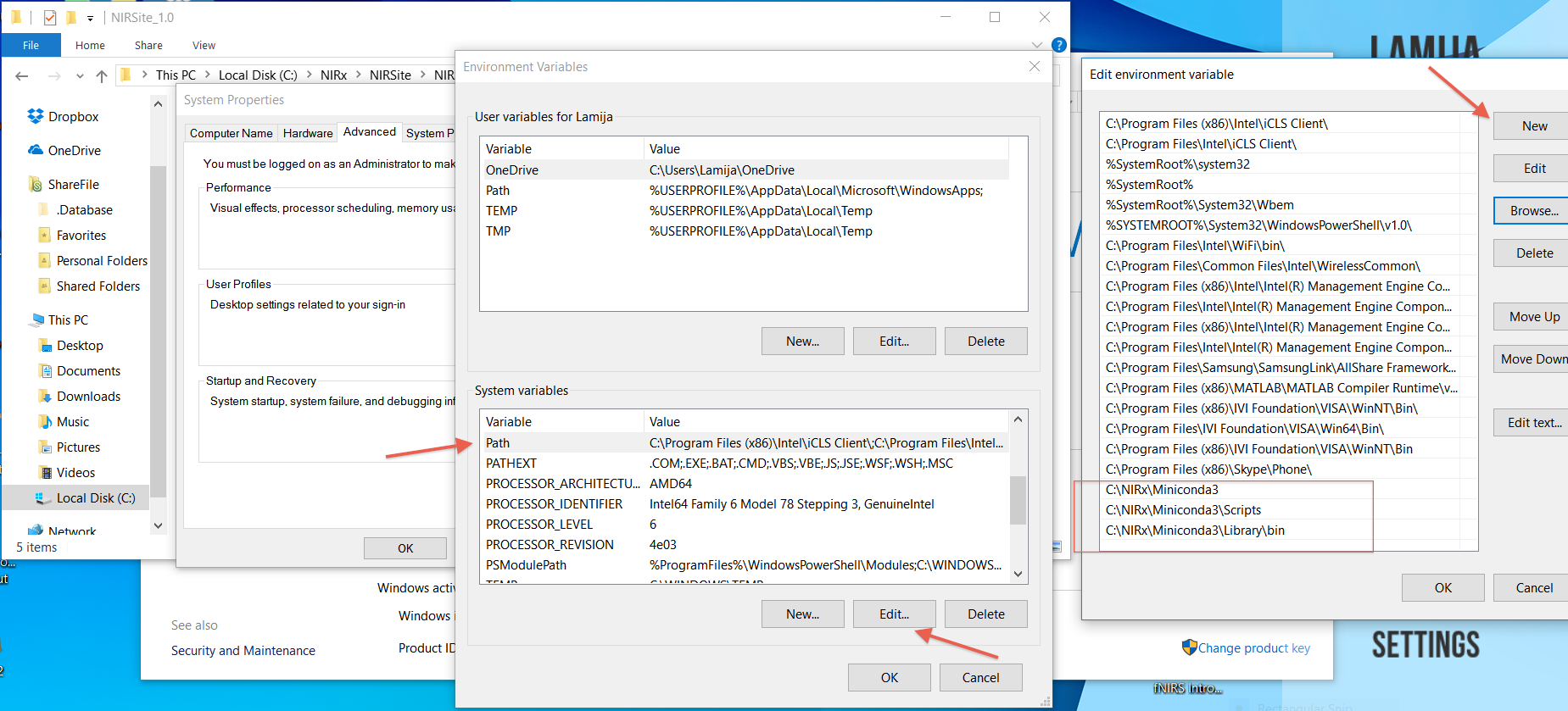
Figure 1: System Path variables can be added.
- Here, the following directories should be added:
-
C:\NIRx\Miniconda3\.
-
C:\NIRx\Miniconda3\Scripts.
-
C:\NIRx\Miniconda3\Library\bin.
Please note that if you installed NIRSite in a different folder than the default folder, the folders should be adjusted accordingly.
- Confirm these changes. NIRSite should now correctly launch.
Additional solutions
If NIRSite still does not run after manually adding the Anaconda directories to the System path, please check the following:
- Make sure that %SystemRoot%\system32 is added to the System path. By default, this should be the case. If it is not, please add it to the System path.
- It may be that another Python distribution is installed on your computer. This distribution might interfere with the Anaconda distribution that is installed with NIRSite. If step 1 above does not solve your problem, please try removing other Python/ Anaconda path variables from your System path. However, this might affect other software installed on your computer.
If you are unsure how to proceed, or if these solutions do not solve your problem, please contact NIRx support at support@nirx.net.